Functions
~/.functions is loaded by both bash and zsh. Functions can take arguments and run several
commands, which aliases can’t.
Make a folder (and any missing parent folders) and go into it.
take projects/new-app # same as: mkdir -p projects/new-app && cd projects/new-appA compact summary of the machine — like the message you see after SSH-ing into a server.
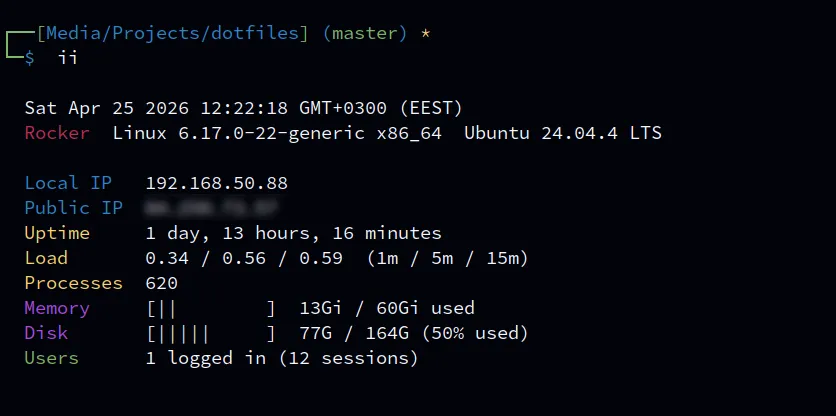
Shows: date and time, hostname, kernel and OS name, local and public IP, uptime, load average (1 / 5 / 15 minutes), number of processes, memory and disk use with a 10-character bar, and logged-in users.
- Bars change colour by usage: white under 60%, yellow 60–84%, red 85% and up.
- Users counts distinct people, not sessions — five tmux panes are still one user.
- Works on Linux and macOS, and shows
n/afor anything it can’t find instead of failing. - Public IP needs internet. It waits at most 3 seconds (
curl --max-time 3), then showsn/a. - The local IP is the one on the interface that leads to the internet (same as
myip).
All your IP addresses at once: the local one, and the public one asked two different ways.
myip# Local 192.168.1.20# ifconfig.me 203.0.113.31# OpenDNS 203.0.113.31With IPv6 available, a second column appears:
myip# IPv4 IPv6# Local 192.168.1.20 2001:db8::20# ifconfig.me 203.0.113.31 2001:db8::99# OpenDNS 203.0.113.31 2001:db8::99- Local — this machine’s address on your network: the one on the interface that leads to the internet (Wi-Fi, Ethernet or VPN, whichever is in use), not just the first one listed.
- ifconfig.me — a web server reports the address your web traffic comes from.
- OpenDNS — a DNS server reports the address your DNS lookups come from.
The two public answers usually match. If they differ, web traffic and DNS leave through different routes — for example a VPN or proxy that only covers one of them.
- The IPv6 column only shows when an IPv6 address is found. Without IPv6 internet you get the
short IPv4 table. The IPv6 lookups fail instantly in that case, so
myipstays fast. - Each lookup gives up after 3 seconds and shows
-instead of hanging. - Needs
curl. The OpenDNS row also needsdig(Debian/Ubuntu:dnsutils, Fedora:bind-utils, built into macOS); without it you seeinstall dig. - The local address comes from
ip route get(Linux),hostname -I(older Debian/Ubuntu setups) or the default route’s interface (macOS). Minimal containers may have none of these and show-. localipused to be a separate alias; it’s part ofmyipnow.
getwebsite
Section titled “getwebsite”Download a whole website to read offline.
getwebsite https://example.com/docs/Runs wget with:
| Flag | Meaning |
|---|---|
-r |
follow links (recursive) |
-p |
also get images, CSS and JS each page needs |
-k |
rewrite links to point at the local copies |
-np |
never go above the starting folder |
-l 5 |
at most 5 links deep (so it can’t crawl forever) |
-e robots=off |
ignore robots.txt |
-U mozilla |
identify as a browser |
--random-wait |
vary the delay between requests, to avoid rate limits |
Show network connections, filtered by a port or program name.
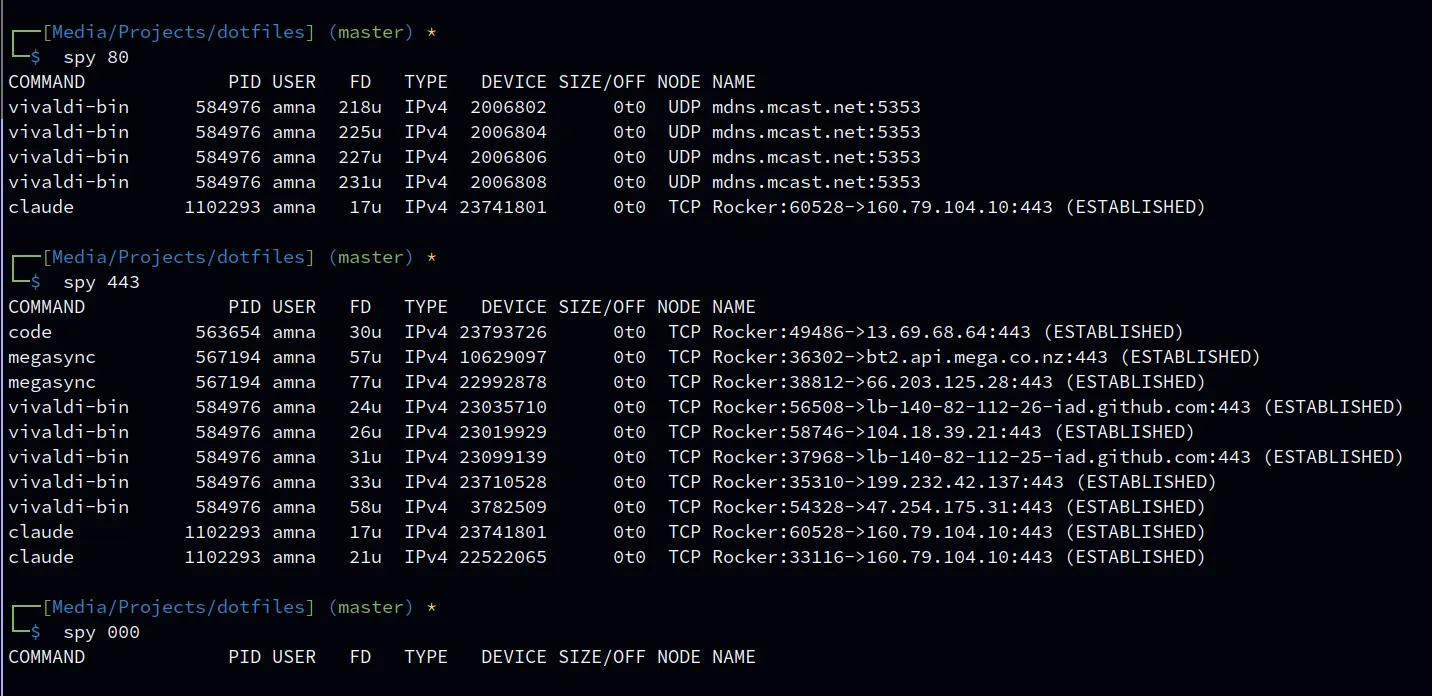
spy 8080 # what's using port 8080?spy chrome # what is Chrome connected to?sudo spy 443 # include other users' processesIt runs lsof -i -P +c 0 +M (internet connections, numeric ports, full program names) and
filters with awk so the column header stays — a plain grep would drop it.
- Matching ignores case and isn’t a regex, so
127.0.0.1matches literally. - Without
sudoyou only see your own processes.
Start a tmux session for the current folder, using a tmuxp layout if there is one.
It tries, in order:
tmuxp.yamlin the current folder~/.config/tmuxp/default.yaml- A plain tmux session
The session is named after the folder. If the layout file doesn’t set session_name (and
start_directory), t adds them for you in a temporary copy, so one default layout works for
every project.
cd ~/projects/dotfiles && t # session "dotfiles"Edge cases:
tmuxpnot installed → plain tmux session, with a note.- Folder names with
.or:are changed to_(tmux doesn’t allow them in session names):my.app→my_app. - A session with that name already exists → tmux refuses to create a second one. Attach
with
tmux attach -t <name>instead. - No
~/.config/tmuxp/default.yaml(the installer copies it, so only if you deleted it) → plain tmux session. See tmuxp.
Removed functions
Section titled “Removed functions”Older versions had a few more:
extract— use the archive tool directly (tar xf,unzip).sniff— usetcpdumportshark.bell— a terminal bell when a command finished; unreliable across terminals (also whyenable_audio_bellleftkitty.conf). Usealertinstead.
Adding your own
Section titled “Adding your own”Machine-specific functions go in ~/.functions.local — see
Local files.