Starship prompt
Starship draws the prompt — the text before your cursor. One config,
~/.config/starship.toml, drives both bash and zsh, so the prompt looks the same in both.
┌──[~/projects/dotfiles] (main) *└─$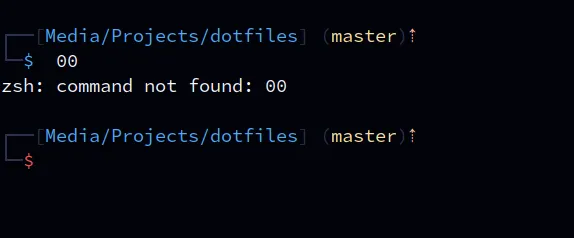
The layout is adapted from Kali Linux’s default zsh prompt.
What each part means
Section titled “What each part means”| Part | Colour | Notes |
|---|---|---|
┌──[ ] └─ and the ( ) |
muted (very dark navy) |
a barely-there frame |
| hostname | teal |
only over SSH — so you know you’re on another machine |
| path | blue |
last 3 folders |
| branch | yellow |
only inside a git repo |
| git status | peach |
* modified, + staged, ? untracked, ! conflict, plus ahead/behind |
$ |
blue / red |
turns red when the last command failed |
There’s a blank line before each prompt so command output is easy to tell apart.
Colours
Section titled “Colours”Colours come from a [palettes.lasik] palette that mirrors the
Lasik VSCode theme. Change a hex value once and
every part using it updates:
[palettes.lasik]blue = "#4daafc" # paths, $yellow = "#FFE2A3" # branchpeach = "#fab795" # git statusred = "#f85149" # $ after an errormuted = "#2A324B" # frameInstalling
Section titled “Installing”The installer installs starship if it’s missing: brew install starship on macOS, the official
installer elsewhere. To do it by hand:
curl -sS https://starship.rs/install.sh | shThen activate it (the dotfiles already do this — only needed without them):
echo 'eval "$(starship init bash)"' >> ~/.bash_profileecho 'eval "$(starship init zsh)"' >> ~/.zshrcEdge cases
Section titled “Edge cases”- No starship (minimal server, install failed): bash uses its
fallback prompt; zsh shows its plain default
%prompt. - Icons show as boxes: the terminal font has no Nerd Font icons. This config uses plain characters, but other tools might not. The installer can install a Nerd Font for you — see kitty.
- Installer needs root for starship. The official installer puts it in
/usr/local/binand may ask for yoursudopassword. - The
mutedframe is nearly invisible on light or high-contrast terminal themes — by design on dark themes, but changemutedif you use a light one. - Homebrew installs: starship has to start after Homebrew’s
PATHis set. That’s why its line is at the very end of.zshrc. - The
usernamesection exists in the config but isn’t in the prompt layout, so your username isn’t shown.