Git
Two files: .gitconfig (defaults and aliases) and .gitignore_global (files to ignore
everywhere).
What the installer does
Section titled “What the installer does”Your ~/.gitconfig holds your name, email and credentials, so the installer doesn’t replace
it. Instead it adds the repo’s settings one at a time with git config --global:
- A setting you don’t have yet is added:
installed: git pull.rebase = true - A setting you already have is kept, even if it’s different:
kept: git pull.rebase = false (yours; the dotfiles use true) .gitignore_globalis copied to~/.gitignore_global, andcore.excludesfileis set to it, unless you already point git at another ignore file.
Nothing happens if git isn’t installed (you get a warning).
.gitconfig defaults
Section titled “.gitconfig defaults”| Setting | Value | Why |
|---|---|---|
init.defaultBranch |
main |
new repos start on main (GitHub’s default) instead of master |
core.autocrlf |
input |
Windows line endings (CRLF) become LF when you commit, never the other way. Stops files edited on Windows from showing every line as changed |
pull.rebase |
true |
git pull puts your local commits on top of the remote ones instead of making a merge commit, so history stays a straight line |
To set them by hand instead:
git config --global init.defaultBranch maingit config --global core.autocrlf inputgit config --global pull.rebase true.gitconfig aliases
Section titled “.gitconfig aliases”| Alias | What it does |
|---|---|
git lg |
compact, coloured history graph of all branches |
git s |
git status |
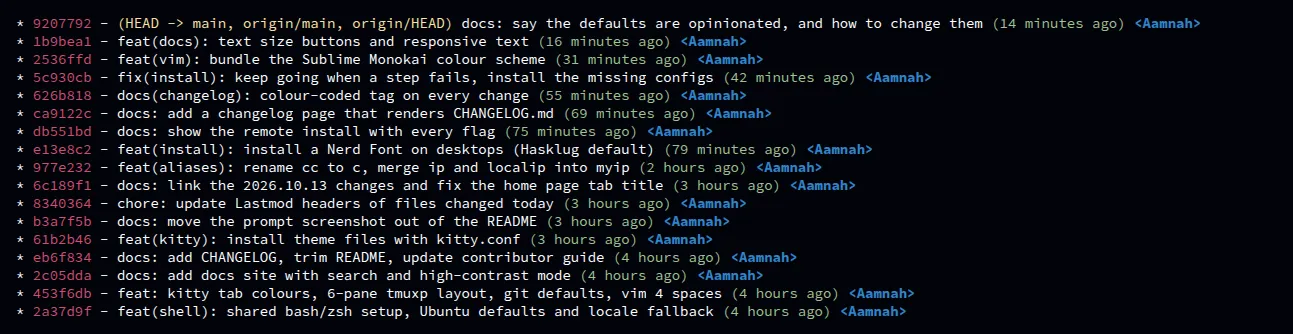
git lg shows one line per commit: short hash (red), branch/tag names (yellow), message, age
(green) and author (blue), with a graph of how branches join.
The [user] section is empty on purpose — don’t commit your email to a public repo.
Set the aliases by hand
Section titled “Set the aliases by hand”git config --global alias.s statusgit config --global alias.lg "log --color --graph --pretty=format:'%Cred%h%Creset -%C(yellow)%d%Creset %s %Cgreen(%cr) %C(bold blue)<%an>%Creset' --abbrev-commit --branches"--global writes to ~/.gitconfig, adding to what’s there.
.gitignore_global
Section titled “.gitignore_global”A list of files git should ignore in every repo: macOS and Windows clutter (.DS_Store,
Thumbs.db, ._*), Python and C++ build output (*.pyc, *.out), node_modules, venv,
.vscode and cache folders.
Git only uses it if core.excludesfile points to it. The installer sets that up; by hand:
cp .gitignore_global ~/.gitignore_globalgit config --global core.excludesfile "$HOME/.gitignore_global"